
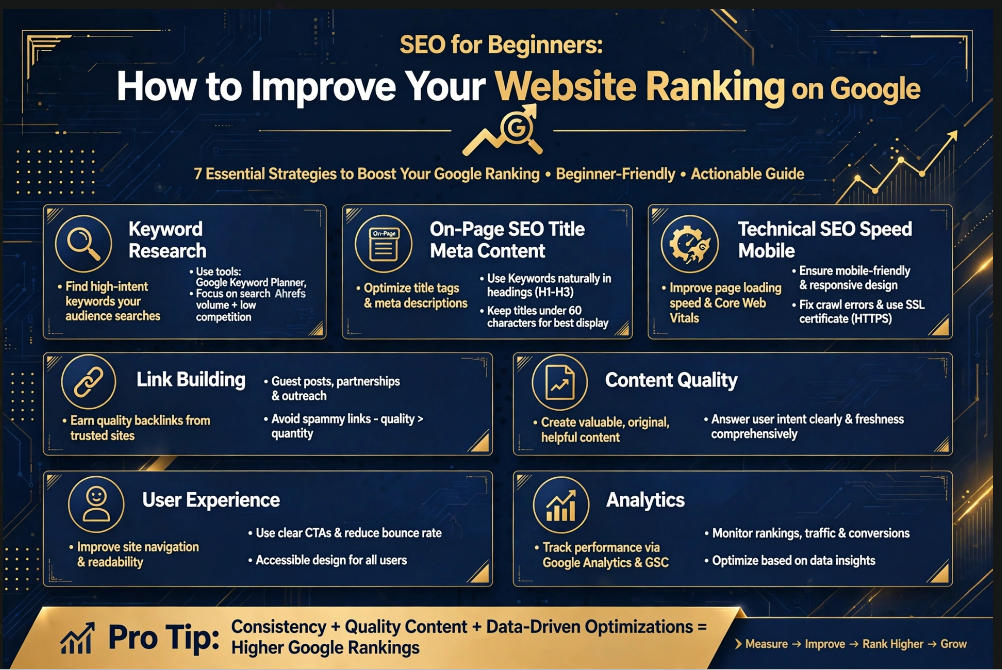
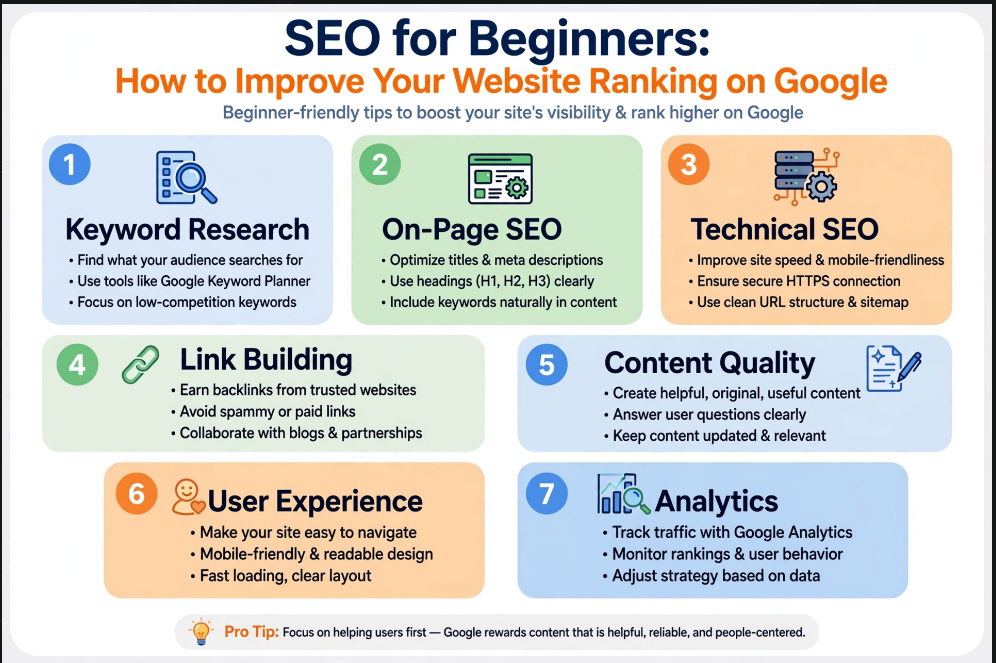
If you have a website but are struggling to get visitors from Google, you are not alone. Creating a website is only the first step. To attract consistent organic traffic, your website needs to be easy for search engines to discover, understand, and index while also providing genuinely useful information to visitors.
This is where SEO for Beginners becomes important.
Search Engine Optimization, commonly known as SEO, is the process of improving a website so that its pages can appear more prominently in relevant search results. SEO includes keyword research, content optimization, technical improvements, internal linking, website performance, authority building, and many other activities.
The good news is that you do not need to be an advanced SEO for Beginners and professional to start. By understanding the fundamentals and applying them consistently, beginners can build a strong SEO foundation.
In this guide, you will learn 15 practical SEO strategies that can help improve your website’s visibility on Google. You will also learn how to choose keywords, optimize pages, improve technical SEO, create helpful content, build internal links, measure performance, and avoid common mistakes.
Table of Contents
- What Is SEO?
- How Google Search Works
- Why SEO Matters for Beginners
- Start With Keyword Research
- Understand Search Intent
- Create Helpful and Original Content
- Optimize Your SEO Title
- Write Better Meta Descriptions
- Use Proper Headings
- Optimize Your URLs
- Improve Internal Linking
- Optimize Images
- Improve Website Speed
- Make Your Website Mobile-Friendly
- Set Up Google Search Console
- Improve Technical SEO
- Build Quality Backlinks
- Optimize Local SEO
- Update Old Content
- Measure SEO Performance
- Common SEO Mistakes to Avoid
- A Simple SEO Checklist for Beginners
- Final Thoughts
What Is SEO?
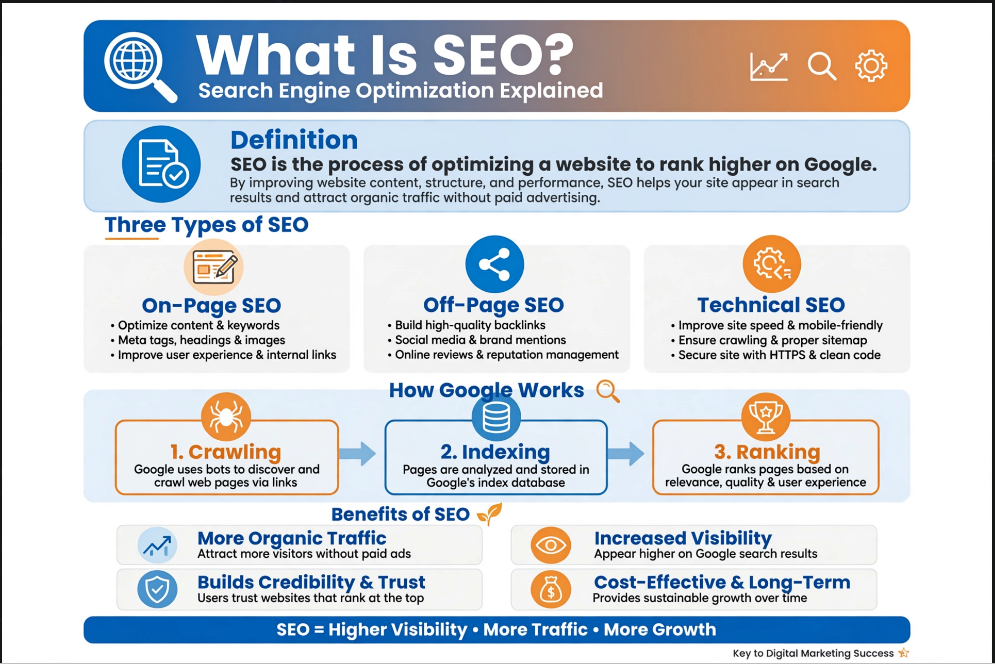
SEO stands for Search Engine Optimization. It involves improving different parts of a website so that search engines can better understand its content and users can find useful information through search.
For example, imagine that you own a digital marketing website and publish an article about SEO for Beginners . Someone searches for “how to create a Google Ads campaign for beginners.”
If your article clearly answers that question, uses relevant terminology, provides useful information, loads quickly, and can be properly crawled and indexed, it may become eligible to appear in Google’s search results.
SEO does not mean simply adding a keyword repeatedly to a page.
Modern SEO for Beginners are much broader. It involves creating useful content, understanding what users are searching for, making pages accessible to search engines, improving the user experience, earning relevant links, and maintaining a technically healthy website.
Google’s own documentation emphasizes creating helpful, reliable, people-first content rather than content produced primarily to manipulate search rankings. [Google Search Central]
How Google Search Works
Before starting SEO for Beginners, it is useful to understand the basic search process.
Search engines generally need to discover pages, crawl their content, process and understand the information, and determine which results are relevant for particular searches.
Three important concepts are:
Crawling
Crawling is the process through which search engine systems discover and access web pages.
Google uses automated systems called crawlers to discover pages and follow links between pages.
If important pages cannot be crawled, search engines may have difficulty accessing their content.
Indexing
After discovering and processing a page, Google may store information about that page in its index.
A page generally needs to be accessible and indexable before it can appear in Google’s organic search results.
Ranking
When someone performs a search, Google’s systems determine which results are most relevant and useful for that particular query.
This means that simply publishing a page does not guarantee that it will rank.
Your goal should be to create content that satisfies the searcher’s needs while maintaining a technically accessible website.
Why SEO Matters for Beginners
One of the biggest benefits of SEO for Beginners are that it can help your website attract people who are actively searching for information, products, services, or solutions related to your business.
For example, a real estate website could target searches such as:
- property dealers in Delhi
- property documents required for buying a house
- commercial property investment guide
- residential property buying tips
- how to verify property documents
A digital marketing website might target:
- SEO for beginners
- Google Ads tutorial
- Meta Ads guide
- keyword research tips
- technical SEO checklist
The important point is relevance.
You should not attempt to rank for every possible keyword. Instead, focus on topics that are genuinely useful for your target audience.
This is one of the most important principles of SEO for Beginners: create content for people first and optimize it for search engines naturally.
1. Start With Keyword Research
Keyword research is one of the foundations of SEO for Beginners.
A keyword is a word or phrase that people type into search engines.
For example:
“SEO”
is a broad keyword.
“SEO for beginners”
is more specific.
“SEO for beginner step by step”
is even more specific.
As a beginner, long-tail keywords can be useful because they often provide a clearer indication of what the searcher wants.
Start by creating a list of questions and topics related to your business.
Ask yourself:
- What does my audience search for?
- What problems do my customers have?
- What questions do potential customers ask?
- What services or products do I offer?
- What information would help someone make a decision?
You can then research these topics using tools such as Google Search, Google Search Console, Google Trends, keyword research platforms, and competitor research.
Do not choose keywords only because they have high search volume.
A keyword with lower search volume can still be valuable if it attracts highly relevant visitors.
Focus on Search Relevance
Suppose you operate a local property business.
Ranking for “real estate” might sound attractive, but the term is extremely broad.
A more specific search such as “property dealer in Delhi” may be much more relevant to a local business.
Your keyword strategy should therefore balance:
- Search relevance
- Search intent
- Competition
- Business value
- Content usefulness
2. Understand Search Intent
Search intent refers to the reason behind a search.
Understanding intent is an essential part of SEO for Beginners because two keywords can look similar while representing completely different needs.
There are several common types of search intent.
Informational Intent
The user wants information.
Examples:
- What is SEO?
- How does Google Search work?
- How to optimize a website?
These searches are generally suitable for guides, tutorials, and educational articles.
Navigational Intent
The user wants to find a specific website, company, or page.
Examples:
- Google Search Console
- Facebook Ads Manager
- Singh Properties
Commercial Investigation
The user is researching options before making a decision.
Examples:
- best SEO tools [ SEO for Beginners ]
- SEO agency pricing
- WordPress SEO plugins
Transactional Intent
The user is ready to take an action.
Examples:
- buy property in Delhi
- hire SEO agency
- purchase SEO software
Before creating a page, determine what the searcher actually wants.
Then build the page around that intent.
3. Create Helpful and Original Content
Content remains a major part of SEO because search engines need information to understand what a page is about.
However, simply writing thousands of words is not enough.
Google specifically states that creators should focus on helpful, reliable, people-first content rather than producing content primarily to manipulate search rankings.
Your content should answer the reader’s question clearly.
For example, if your article is about SEO for Beginners, don’t spend the first 1,000 words discussing unrelated marketing topics.
Get to the point.
Explain the concept.
Give examples.
Provide practical steps.
Answer common questions.
Include useful resources.
Make Your Content More Valuable
Try to add information that makes your article genuinely useful.
You can include:
- Real examples
- Step-by-step instructions
- Screenshots
- Original observations
- Case studies
- Checklists
- Tables
- FAQs
- Expert explanations
- Relevant statistics
- Practical mistakes to avoid
Long content is not automatically better.
The goal should be completeness and usefulness, not reaching an arbitrary word count.
4. Optimize Your SEO Title
Your SEO for Beginners is one of the first things users may see in search results.
A good title should accurately describe the page and encourage relevant users to click.
For this article, the recommended title is:
SEO for Beginners: 15 Powerful Ways to Improve Your Website Ranking on Google
It includes:
- The focus keyword
- A number
- A power word
- The primary topic
- A clear benefit
Avoid creating misleading titles.
If the article promises 15 strategies, make sure the article actually provides 15 meaningful strategies.
Your title should communicate what the visitor can expect after clicking.
5. Write Better Meta Descriptions
A meta description is a short description that can help communicate what a webpage is about in search results.
For this article, you can use:
SEO for Beginners: learn 15 powerful ways to improve Google rankings, optimize content, fix technical SEO, build links, and grow organic traffic.
Include your primary keyword naturally.
However, don’t stuff keywords into the description.
Write it for people.
The description should give users a reason to understand what they will find on the page.
6. Use Proper Headings
Headings make content easier to scan.
A good SEO article should have a clear hierarchy.
For example:
H1: SEO for Beginners: 15 Powerful Ways…
H2: What Is SEO?
H3: Crawling
H3: Indexing
H3: Ranking
H2: How Google Search Works
This structure helps readers understand the organization of your content.
It can also help search engines understand the relationship between different sections.
Avoid adding headings simply to insert keywords.
Each heading should introduce a meaningful section.
7. Optimize Your URLs
A good URL should be short, descriptive, and easy to understand.
For this article, use:
/seo-for-beginners/
Avoid unnecessarily long URLs such as:
/2026/10/02/seo-for-beginners-how-to-improve-your-website-ranking-on-google-complete-guide/
A shorter URL is easier to read, share, and remember.
Use the primary topic naturally in the URL.
Avoid unnecessary numbers, symbols, and complicated parameters whenever possible.
8. Improve Internal Linking
Internal linking means linking from one page of your website to another page on the same website.
Internal links help users discover related content and can help search engines understand the relationship between pages.
For example, if you have another article about technical SEO, you could link to it using descriptive anchor text such as:
Learn more about our Technical SEO Checklist.
If you have an article about Google Ads, you could link relevant readers to:
Google Ads Campaign Optimization Guide
Use internal links where they genuinely help the reader.
Do not add dozens of unrelated links just to increase the number of links on a page.
Suggested Internal Links
Add links to relevant pages such as:
- [Internal Link: Your SEO Services Page]
- [Internal Link: Technical SEO Guide]
- [Internal Link: Keyword Research Guide]
- [Internal Link: Google Ads Guide]
- [Internal Link: Contact or Consultation Page]
Replace each placeholder with the actual URL from your website.
9. Optimize Images
Images can improve the readability and visual appeal of your content.
However, large or poorly optimized images can also slow down a website.
Use descriptive filenames.
Instead of:
image123.jpg
use:
seo-for-beginners-google-ranking.jpg
Also write useful alternative text.
For the featured image of this article, an appropriate ALT text could be:
SEO for Beginners guide to improving Google rankings
ALT text should describe the image rather than contain unnecessary keyword repetition.
Compress large images before uploading them.
Modern image formats such as WebP can often reduce file size while maintaining good visual quality.
10. Improve Website Speed
Website performance matters for both users and website owners.
A slow website can create a frustrating experience, particularly on mobile devices and slower internet connections.
Use Google’s PageSpeed Insights to test individual pages.
You can check:
- Mobile performance
- Desktop performance
- Core Web Vitals
- Performance opportunities
- Accessibility-related issues
- Other technical recommendations
Google recommends considering the overall page experience rather than focusing on only one metric.
A technically strong website should load efficiently, work properly across devices, and allow visitors to access the main content without unnecessary obstacles.
11. Make Your Website Mobile-Friendly
A large portion of web browsing occurs on mobile devices.
Therefore, mobile usability should be an important part of SEO for Beginners.
Check your website on:
- Android phones
- iPhones
- Tablets
- Desktop computers
Make sure:
- Text is readable.
- Buttons are easy to tap.
- Navigation works properly.
- Images fit the screen.
- Forms are usable.
- Pop-ups do not interfere with important content.
- Pages don’t require horizontal scrolling.
Responsive web design can help your website adapt to different screen sizes.
Don’t optimize only for your own phone.
Test multiple screen sizes whenever possible.
12. Set Up Google Search Console
Google Search Console is one of the most useful free tools for anyone learning SEO for Beginners.
It can provide information about how your website performs in Google Search.
Depending on your site and setup, you can use Search Console to monitor things such as:
- Search queries
- Clicks
- Impressions
- Click-through rate
- Average position
- Indexing
- Page performance
- Search enhancements
- Technical issues
Search Console can also help you identify pages that Google has discovered or indexed and highlight issues that may need attention.
Start by verifying your website.
Then submit your sitemap if appropriate.
After that, regularly review your performance data.
13. Improve Technical SEO
Technical SEO focuses on aspects of a website that help search engines access, crawl, understand, and process content.
Important areas include:
XML Sitemap
An XML sitemap provides information about pages you want search engines to discover.
Most modern CMS platforms and SEO plugins can help generate sitemaps automatically.
Robots.txt
The robots.txt file can provide crawling instructions.
However, it should be configured carefully because incorrect directives can prevent crawlers from accessing important content.
Canonical URLs
Canonicalization helps communicate which URL should be considered the preferred version when similar or duplicate URLs exist.
HTTPS
Your website should use HTTPS so that connections between visitors and your website are encrypted.
Indexing
Make sure important pages are not accidentally marked as noindex.
Technical mistakes can prevent otherwise excellent content from appearing in search.
14. Build Quality Backlinks
A backlink is a link from another website to your website.
Links can help search engines discover pages and can contribute to how websites are understood in the broader web ecosystem.
However, you should focus on earning relevant and legitimate links rather than purchasing or creating large numbers of low-quality links.
Good link opportunities can include:
- Industry publications
- Relevant directories
- Local business resources
- Professional associations
- Guest contributions
- Original research
- Useful statistics
- Digital PR
- Resource pages
For example, if you publish original research about the real estate market, another relevant publication may naturally reference your research.
That type of editorial link can be much more meaningful than hundreds of irrelevant directory links.
Avoid Manipulative Link Building
Do not create large numbers of unnatural links simply to manipulate rankings.
Google maintains spam policies covering practices designed to manipulate search results.
Your long-term strategy should be to publish useful resources that people have a genuine reason to reference.
15. Optimize Local SEO
If your business serves customers in a particular location, local SEO can be extremely useful.
For example, a local property business might target searches such as:
- property dealer in Delhi
- real estate consultant in Delhi
- residential property dealer near me
- commercial property consultant in Delhi
Create location-specific pages only when they provide genuine value.
Include accurate business information.
Keep your business details consistent across important online profiles and directories.
For local businesses, a Google Business Profile can also help customers discover business information in Google Search and Maps.
Your website should clearly communicate:
- Business name
- Service area
- Contact information
- Services
- Location
- Opening hours where relevant
- Customer information
- Useful local content
Don’t create dozens of nearly identical location pages just by replacing city names.
Each page should offer unique, useful information.
16. Update Old Content
SEO is not always a “publish once and forget” process.
Some pages can improve when you update them.
Review older articles periodically.
Ask:
- Is the information still accurate?
- Are statistics outdated?
- Are links broken?
- Are there better examples?
- Can the introduction be improved?
- Are there missing sections?
- Can internal links be added?
- Are images outdated?
- Does the title accurately describe the article?
Updating content should involve meaningful improvements.
Don’t simply change the publication date without substantially improving the content.
17. Use Descriptive Anchor Text
Anchor text is the clickable text used in a link.
Compare:
Click here
with:
Learn how to improve Core Web Vitals
The second option provides more context.
Use descriptive anchor text where it naturally fits.
For internal links, connect related topics logically.
For example:
If your article discusses page speed, link to your detailed page-speed guide.
If you discuss keyword research, link to your keyword research tutorial.
If you discuss Google Ads, link to your relevant advertising guide.
This creates a stronger content network across your website.
18. Create Topic Clusters
Instead of publishing random articles, organize your content around related topics.
Suppose your main topic is SEO.
You could create a central pillar page:
SEO for Beginners
Then create supporting articles:
- Keyword Research for Beginners
- On-Page SEO Guide
- Technical SEO Guide
- Local SEO Guide
- Internal Linking Guide
- Link Building Guide
- Google Search Console Guide
- Core Web Vitals Guide
These supporting pages can link to the main article and to each other where relevant.
This creates a logical content structure.
It can also help visitors move naturally from introductory information to more detailed resources.
19. Improve Your Content’s Readability
Even excellent information can perform poorly from a user-experience perspective if it is difficult to read.
Keep paragraphs relatively short.
Use bullet points when appropriate.
Add descriptive headings.
Highlight important concepts.
Use examples.
Avoid unnecessary jargon.
Instead of writing a huge block of text, divide information into logical sections.
For example:
Poor structure:
One long paragraph explaining keyword research, search intent, content optimization, technical SEO, links, and analytics.
Better structure:
Keyword Research
Explain keywords.
Search Intent
Explain user expectations.
Content Optimization
Explain how to create useful content.
This makes the page easier to scan.
20. Measure SEO Performance
You cannot improve what you never measure.
Use tools such as Google Search Console and analytics platforms to monitor performance.
Important metrics can include:
Impressions
How often your pages appeared in search results.
Clicks
How many users clicked your search result.
CTR
Click-through rate compares clicks with impressions.
Average Position
Search Console can provide an average position metric for queries and pages.
Organic Traffic
Analytics tools can help you understand how many visitors arrive through organic search.
Conversions
Traffic alone is not always the final goal.
For a business website, measure actions such as:
- Form submissions
- Phone calls
- WhatsApp enquiries
- Purchases
- Bookings
- Consultation requests
A page attracting 10,000 visitors is not necessarily more valuable to a business than a page attracting 500 highly relevant visitors who generate enquiries.
21. Understand E-E-A-T
Google discusses E-E-A-T as Experience, Expertise, Authoritativeness, and Trustworthiness.
E-E-A-T is not itself a single ranking factor.
Instead, it is a useful framework for thinking about content quality and trust.
You can strengthen your website’s credibility by providing:
- Clear author information
- Accurate business details
- Contact information
- Original research
- Reliable references
- Expert commentary
- First-hand experience
- Transparent policies
- Updated information
For business websites, clearly communicating who operates the website can also help visitors understand who they are dealing with.
Trust matters particularly when visitors are making important decisions.
22. Avoid Keyword Stuffing
Keyword stuffing means excessively repeating keywords in an attempt to manipulate rankings.
For example, writing:
“SEO for Beginners is the best SEO for Beginners guide for SEO for Beginners because SEO for Beginners helps beginners learn SEO for Beginners.”
is poor writing.
It makes the page uncomfortable to read.
Instead, use your keyword naturally.
You can also use related terminology such as:
- search engine optimization
- organic traffic
- Google Search
- keyword research
- website optimization
- search visibility
- on-page optimization
Semantic relevance comes naturally when you thoroughly explain a topic.
23. Don’t Expect Immediate Results
One of the biggest mistakes beginners make is expecting Google rankings to improve overnight. SEO for Beginners can take time.
The timeline varies depending on factors such as:
- Website history
- Competition
- Content quality
- Search demand
- Technical condition
- Industry
- Website authority
- Search intent
- Existing backlinks
Some pages may begin receiving impressions relatively quickly.
Others may require consistent improvement over a much longer period.
Instead of checking rankings every few hours, establish a reasonable measurement routine.
For example, review important SEO metrics monthly and make changes based on the data.
24. Create a Consistent SEO Strategy SEO for Beginners usually comes from consistent execution rather than one single trick.
Create a publishing schedule that you can realistically maintain.
For example:
Week 1: Keyword research
Week 2: Publish one high-quality article
Week 3: Improve existing content
Week 4: Review Search Console and technical issues
You can repeat this process every month.
The exact schedule is less important than maintaining quality and consistency.
25. Use Google Search Results for Research
Google itself can be a useful research tool.
Search your target keyword and examine the results.
Look at:
- Titles
- Headings
- Content formats
- Questions users ask
- Featured results
- Related searches
- Common subtopics
The goal isn’t to copy competing pages.
Instead, identify what searchers expect and determine how your page can provide a more useful experience.
For example, if most results contain step-by-step guides, your article should probably explain the process clearly.
If users are looking for comparisons, provide comparisons.
If users want examples, include SEO for Beginners examples.
26. Optimize for Humans, Not Just Search Engines
One of the most important lessons in SEO for Beginners is that SEO should support the user experience.
Before publishing a page, ask:
Would a real visitor find this useful?
Does the introduction answer the question?
Are the examples clear?
Is the information trustworthy?
Is the page easy to navigate?
Does it provide something beyond generic information?
Would I recommend this article to someone who asked this question?
These questions can help you avoid search-engine-first content.
Google’s current guidance emphasizes people-first content and warns against creating large amounts of content primarily for search traffic without providing substantial value.
27. Create Better Calls to Action
SEO for Beginners brings visitors to your website, but your website should also help them take the next step.
Depending on your business, your CTA might be:
- Contact us
- Request a consultation
- Get a quote
- Book a call
- Download the guide
- View properties
- Send an enquiry
- Subscribe to updates
The CTA should match the visitor’s intent.
For an informational blog post, don’t immediately overwhelm the visitor with aggressive sales messages.
First provide value.
Then offer a logical next step.
28. A Simple SEO Workflow for Beginners
If you are completely new to SEO, follow this workflow.
Step 1: Choose a Topic
Select a topic relevant to your audience and business.
Step 2: Find a Primary Keyword
Choose a clear keyword that represents the main topic.
Step 3: Understand Search Intent
Determine what people expect when searching that keyword.
Step 4: Create an Outline
Plan your H2 and H3 sections before writing.
Step 5: Write Helpful Content
Answer the searcher’s question comprehensively.
Step 6: Optimize the Page
Add your keyword naturally to the:
- SEO title
- URL
- Introduction
- Relevant headings
- Main content
- Meta description
- Image ALT text where appropriate
Step 7: Add Internal Links
Link to relevant pages on your own website.
Step 8: Add External References
Reference trustworthy external sources where they improve the content.
Step 9: Improve UX
Check readability, mobile responsiveness, navigation, and page speed.
Step 10: Submit and Monitor
Use Google Search Console to monitor indexing and search performance.
29. SEO Checklist for Beginners
Before publishing your next article, use this checklist.
Keyword Checklist
- Focus keyword selected
- Search intent identified
- Primary keyword appears naturally
- Relevant secondary keywords included
- No keyword stuffing
On-Page SEO Checklist
- SEO for Beginners optimized
- Focus keyword near beginning of title
- Meta description written
- Short URL created
- Focus keyword used naturally near the beginning
- H1 added
- H2/H3 headings organized
- Image ALT text added
- Internal links added
- External resources referenced
Technical SEO Checklist
- HTTPS enabled
- Mobile-friendly design
- XML sitemap available
- Important pages indexable
- No accidental noindex tags
- Website loads efficiently
- Broken links checked
- Canonical URLs reviewed where necessary
Content Checklist
- Content answers the searcher’s question
- Information is accurate
- Content is original
- Paragraphs are short
- Examples are included
- Helpful images are included
- CTA is relevant
- Content is easy to scan
30. Best Free SEO Resources
Beginners should use reliable first-party resources whenever possible.
Google Search Central provides official documentation covering SEO, crawling, indexing, search appearance, structured data, spam policies, and other topics.
Google Search Console is useful for monitoring how your website performs in Google Search.
PageSpeed Insights can be used to test website performance and identify opportunities for improvement.
You can also explore Google Trends to understand how search interest changes over time.
Use third-party SEO tools for research, but verify important technical and policy information against official documentation where possible.
Final Thoughts
Learning SEO for Beginners does not require mastering every advanced SEO technique on day one.
Start with the fundamentals.
Research what your audience is searching for.
Understand search intent.
Create genuinely useful content.
Optimize titles, URLs, headings, images, and internal links.
Make your website technically accessible.
Improve mobile usability and page performance.
Set up Google Search Console.
Earn relevant links naturally.
Measure your results.
Then improve your strategy based on actual data.
The most important mindset is to stop thinking of SEO as a collection of tricks.
Good SEO is about SEO for Beginners, making your website easier for search engines to understand while making it more useful for the people you want to reach.
If you consistently publish helpful content, maintain a technically healthy website, connect related pages with internal links, and learn from your search perfo